
When purchasing a new server, workstation or PC to support an expansion card, one of the most important things to determine is what type of slot the card requires and whether the computer being purchased supports that slot type. There are three types of slots that have commonly been used over the years: ISA, PCI and PCI Express (PCIe). These are among the most common types of expansion slots found on computer motherboards. Let’s take a look at each of these:
ISA Slots
The ISA slots are shown in green in the image below. ISA is the oldest of the three slot types shown. Computers with ISA slots are no longer available from major computer manufacturers, but Ram PC Systems still offers industrial-class computers with ISA slots for legacy expansion cards and equipment.
PCI Slots
PCI slots replaced ISA slots as the standard expansion slot in PCs. The PCI slots are shown in red in the image below. PCI slots were produced in several different versions, including 5-volt and 3.3-volt slots. PCI-X, which was commonly used in servers and workstations, was also available in 32-bit and 64-bit versions.
PCI slots have largely been replaced by PCI Express, but they are still needed for many legacy expansion cards. Ram PC Systems offers computers with multiple PCI slots for applications that still require PCI hardware.
PCI Express (PCIe) Slots PCIe
PCI Express, commonly abbreviated as PCIe, replaced PCI as the standard expansion interface in modern computers and also replaced AGP for graphics cards. PCIe slots are available in several sizes and configurations, including x1, x4, x8 and x16. The x16 slot is commonly used for graphics cards, while smaller PCIe slots are often used for network cards, serial and parallel port cards, sound cards and other expansion devices. Ram PC Systems offers computers with multiple PCI Express (PCIe) slots for applications that require PCIe hardware.
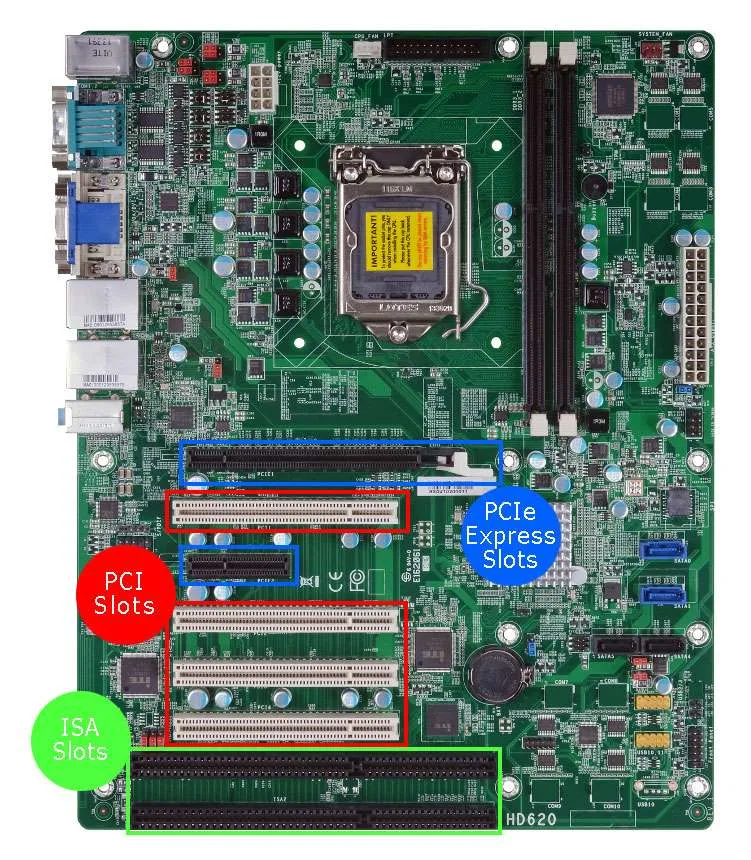
Choosing the Right Computer Slot Type
Before purchasing a computer for an existing expansion card, make sure the motherboard has the correct slot type for your card. ISA, PCI and PCI Express slots are not interchangeable, so identifying the required slot type before purchasing a system can help prevent compatibility problems.
Not sure which slot type your expansion card requires? Contact Ram PC Systems and we can help you determine which computer and motherboard configuration will support your hardware.